Can Other Apps See Your Hidden Photos on iPhone?
Hiding a photo hides it in Photos. It doesn't change what an app with full photo access can read.

Hidlet is an iPhone app
Point your iPhone camera at the code to install. No account needed.
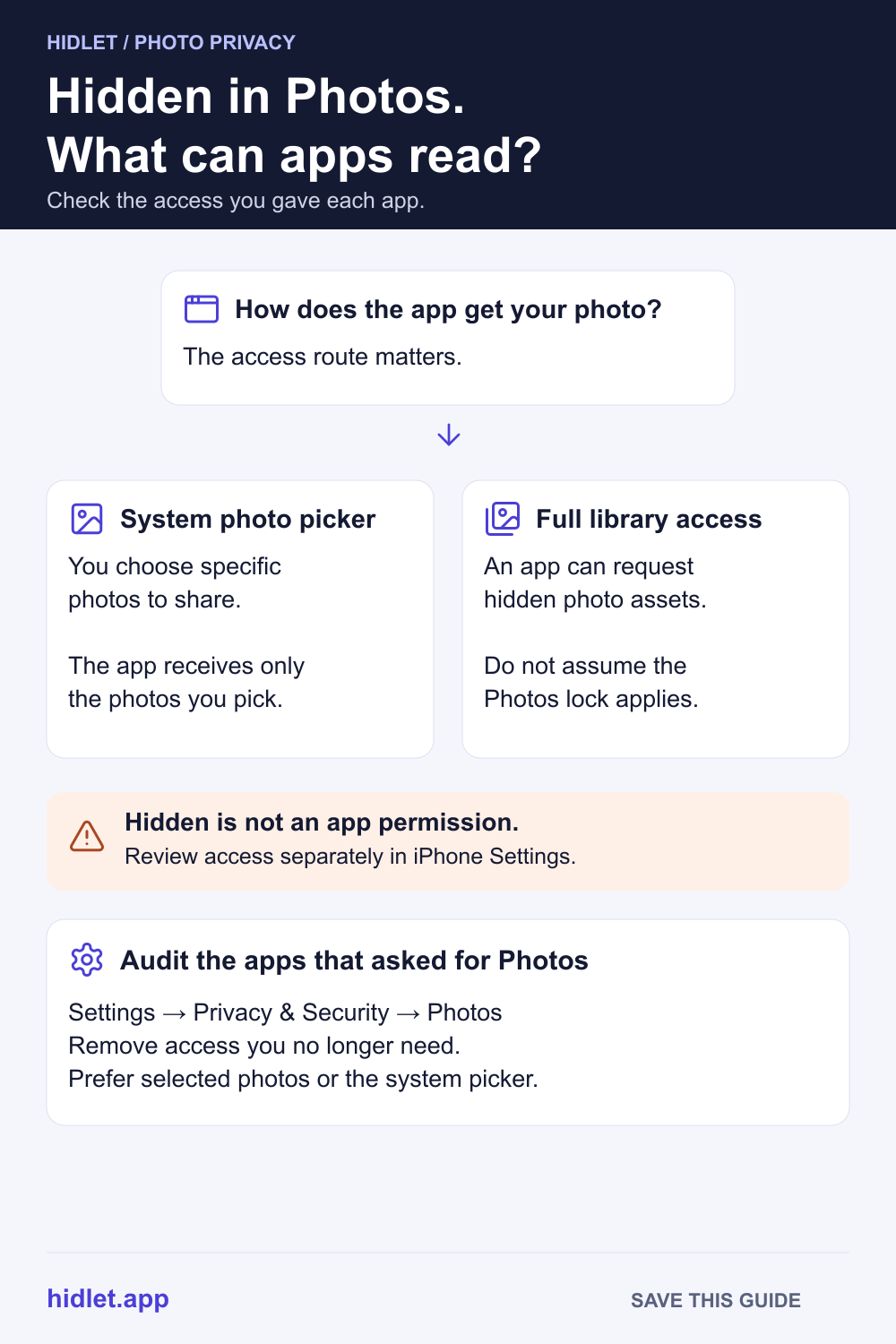
or text me the linkPossibly. Hidden photos are hidden inside the Photos app, but Apple's developer documentation says an app that reads your photo library through Apple's Photos framework can include hidden photos if its code asks for them. Apps that use the system photo picker only get the photos you pick. Check which apps have Photos access in Settings → Privacy & Security → Photos.
You hid a set of photos, and now an app wants “access to your photos”. Does hiding them keep them out of its reach? The honest answer is that it depends on the kind of access you give, and Apple’s own pages are quieter on this than most articles suggest.
This guide covers what hiding does, what a developer’s code can do with full access, why the photo picker is safer, and how to check which apps can read your library.
What hiding does
Apple says that when you hide a photo it moves to the Hidden album, so it doesn’t appear anywhere else in Photos: not in the Library, not in other albums, not even in the Photos widget on your Home Screen. The Hidden album is locked by default with Face ID, Touch ID or your passcode.
All of that describes the Photos app. Apple’s page doesn’t say how another app is treated. For the steps to hide photos, see How to Hide Photos on iPhone.
What an app with full access can do
Apps read your library through Apple’s Photos framework. Apple’s developer documentation for fetching photos has a setting called includeHiddenAssets. By default it is off, and a fetch leaves out photos marked hidden. A developer can switch it on, and then the fetch includes hidden photos too.
In plain words: hidden is a flag on the photo, and an app with full access can choose to read photos with that flag. Most apps won’t, but nothing in Apple’s documentation makes it impossible.
Three things Apple doesn’t say, so we won’t either:
- The Face ID lock. Apple describes it as a way to open the Hidden album in Photos. It doesn’t say the lock applies to other apps.
- Limited access. Apple says the limited library lets you choose specific photos to share with an app. It doesn’t say what happens to hidden photos you select.
- The picker and the Hidden album. Apple doesn’t say whether the system picker shows the Hidden album.
Why the photo picker is safer
Many apps never ask for your library. When you tap “Upload” or “Attach”, they open the system photo picker. Apple says the picker runs in a separate process, so it is private by default: the app gets only the photos you choose, and you don’t need to explicitly authorize it to select photos.
If an app lets you choose, share a few photos instead of your whole library. Apple’s developer guide (iOS 14 and later) describes a Select Photos option that lets you pick the photos to share with an app.
Check which apps can read your photos
- Open Settings.
- Tap Privacy & Security, then Photos.
- Look through the list. Apple says an app appears there only after it has asked for permission.
- Choose an app to change the access you gave it. Apple says that for photos you can change the access given to apps.
Do this for any app you don’t use often. You can always give access again when the app needs it.
Keep private photos out of the library
If a photo must never be readable by another app, the strongest move is to not have it in your photo library at all. A vault keeps its photos in its own encrypted storage, so apps that read your library don’t see them there. Hidlet works this way: you import photos into a vault, and it can offer to delete the originals from Photos afterwards, which asks for Photos permission only when you choose that. Also empty Recently Deleted, because deleted photos stay there for 30 days. Hidlet is available on the App Store.
What Hidlet can and can’t protect
Hidlet protects photos that are inside a vault. It can’t protect photos still in your photo library, and it can’t change what other apps do with the library access you give them. Photos you take with Hidlet’s camera go straight into the open vault, not to the camera roll.
Frequently asked questions
Does the Hidden album stop apps from seeing my photos?
Not by itself. Apple says hidden photos don't appear in the Library, other albums or the Photos widget. Apple's developer documentation says a photo fetch leaves hidden photos out by default, but an app can ask to include them.
Do apps see my whole library when I upload one photo?
Not if the app uses the system photo picker. Apple says the picker runs in a separate process, is private by default, and you don't need to explicitly authorize the app to select photos.
Does the Face ID lock on the Hidden album protect it from other apps?
Apple documents that lock as a Photos feature, for opening the Hidden album in Photos. It doesn't say the lock applies to other apps, so don't rely on it for that.
Can I see which apps can read my photos?
Yes. Apple says to open Settings, tap Privacy & Security, choose Photos, and you'll see the apps that have asked for access. You can change or remove access there.
Sources
- Apple Support — Hide photos and videos on your iPhone, iPad, or Mac
- Apple Developer — PHFetchOptions.includeHiddenAssets
- Apple Developer — Delivering an enhanced privacy experience in your Photos app
- Apple Support — Recover deleted photos and videos on iPhone
- Apple Personal Safety guide — Review and update app privacy settings on Apple devices
Save this guide