Do Hidden Photos Transfer to a New iPhone?
They should arrive hidden. Apple only promises that for one transfer method, so here is how to check before the old phone is wiped.

Hidlet is an iPhone app
Point your iPhone camera at the code to install. No account needed.
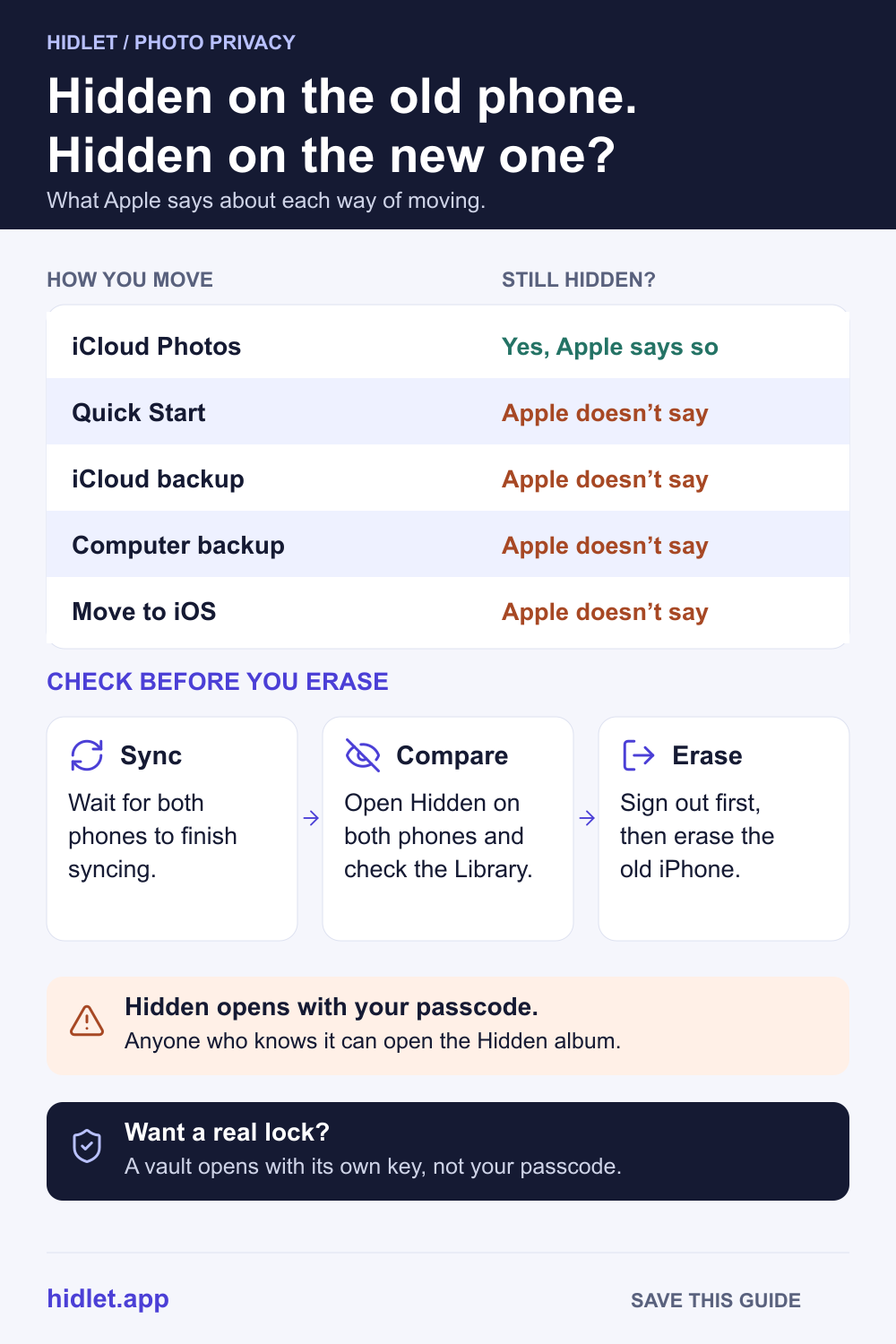
or text me the linkIf you use iCloud Photos, yes. Apple says photos you hide are hidden on all your devices, so once your new iPhone signs in to the same Apple Account and syncs, they show up in its Hidden collection, still hidden. For Quick Start and backups, Apple doesn't say whether the hidden status carries over, so check the Hidden collection on the new phone before you erase the old one.
The new iPhone is set up, your photos are there, and then you wonder: did the hidden ones come across? And if they did, are they still hidden, or are they now sitting in the Library for anyone who picks up the phone?
In most cases they arrive hidden. But Apple only says so for one way of moving photos, and the old iPhone is the only safe copy until you’ve checked. This guide covers what Apple says about each transfer method, what changes on the new phone, and a short check to do before you erase anything.
With iCloud Photos, they arrive still hidden
Apple says that when you use iCloud Photos, any photos you hide are hidden on all your devices. It also says changes to your library on one device show up on your other devices signed in to the same Apple Account.
A new iPhone is simply one more of those devices. Once you sign in and turn on Sync this iPhone in Settings → your name → iCloud → Photos, your library downloads, and the photos you hid stay in the Hidden collection. Give it time: a big library can take a while to download, and the Hidden collection fills in with the rest.
This is the one route where Apple’s own words cover the hidden status.
What Apple says about the other ways to move
Quick Start. Apple’s Quick Start page says you can either transfer your data directly from your previous iPhone or have your apps and data download from iCloud. It doesn’t list photos by name, and it says nothing about the hidden status. Expect your photos to come across, but treat “still hidden” as something to check.
An iCloud backup. Apple says iCloud Backup doesn’t include your photos when iCloud Photos is on, because they’re already in iCloud. When iCloud Photos is off, Apple says iCloud Backup may include the photos in your library. Apple doesn’t say whether a restored backup keeps photos hidden.
A computer backup. Apple says a computer backup includes almost all of your data and settings, but not photos already in iCloud Photos or photos synced from a computer. It doesn’t say whether hidden status survives a restore.
Moving from Android. Apple says the Move to iOS app transfers camera photos and videos and photo albums. It says nothing about photos you hid or locked on the Android phone, so after the move, check whether they arrived and whether they’re showing in your Library.
| How you move | Do hidden photos come across? | Still hidden? |
|---|---|---|
| iCloud Photos | Yes | Yes, Apple says so |
| Quick Start | Apple says your data transfers | Apple doesn’t say; check |
| iCloud backup | Only if iCloud Photos was off (Apple says “may include”); otherwise through iCloud Photos | Apple doesn’t say; check |
| Computer backup | Almost all data, Apple says; not iCloud Photos | Apple doesn’t say; check |
| Move to iOS from Android | Camera photos and albums, Apple says | Apple doesn’t say; check |
What changes on the new phone
The lock is on. Apple says the Hidden and Recently Deleted collections are locked by default and open with Face ID, Touch ID or your passcode. The switch is Use Face ID (or Use Touch ID, or Use Passcode) in Settings → Apps → Photos. Set up Face ID on the new phone first, then check the switch is on.
The album is visible. Apple says the Hidden album shows by default on iPhone. If you’d turned it off on the old phone, check Show Hidden Album in Settings → Apps → Photos on the new one.
Shared Library photos are hidden for everyone. If you hid a photo that’s in an iCloud Shared Photo Library, Apple says it moves to the Hidden album for every participant, and they can view it or stop hiding it. That doesn’t change with a new phone. Do Hidden Photos Show Up in Shared Albums on iPhone? covers the details.
Check before you erase the old iPhone
- Let both phones finish syncing. In Photos, tap Collections and look at your account picture in the top-right corner. A partly filled blue circle around it means photos are still uploading to iCloud. Tap your account picture to see when the phone last synced.
- Open the Hidden collection on both phones. Tap Collections, then Hidden (below Utilities), then View Album. Compare a few photos and the rough count.
- Scroll the new phone’s Library. Make sure none of the hidden photos are showing there.
- Check Recently Deleted on the old phone. Anything you deleted in the last 30 days is still there, unless you already removed it for good. Decide whether you need it before the old phone is gone.
- Sign out, then erase. Apple warns that while you’re signed in to iCloud, deleting photos by hand removes them from iCloud and all your connected devices. So don’t clean up the old phone photo by photo. Sign out first, then use Settings → General → Transfer or Reset iPhone → Erase All Content and Settings.
If something is missing, keep the old phone as it is and wait for iCloud to finish, or move the photos again. For a photo vault app rather than the Hidden album, the steps are different: see How to Move a Photo Vault to a New iPhone Without Losing Photos.
Hidden still isn’t locked away
A new phone is a good moment to ask whether “hidden” is enough. The Hidden album opens with the same passcode as the phone, so anyone who knows that passcode can open it, as Is the iPhone Hidden Album Encrypted? explains.
A vault keeps photos out of your library completely. Hidlet keeps them in encrypted vaults that open only with a pattern you draw, never with your iPhone passcode. With encrypted backup turned on, a vault moves to a new iPhone too: install Hidlet, draw your pattern, and the vault downloads. Restoring with your pattern needs iCloud Keychain turned on; if it’s off, the vault’s 9-word recovery phrase brings it back instead. Hidlet is available on the App Store.
Frequently asked questions
Will my hidden photos show up in the new iPhone's Library?
With iCloud Photos, they shouldn't. Apple says photos you hide on one device are hidden on your other devices too. Check the Hidden collection on the new phone to be sure before you erase the old one.
Does Quick Start move hidden photos?
Apple says Quick Start can transfer your data from the old iPhone, but its pages don't list photos or say whether hidden status is kept. Check the Hidden collection after the transfer.
Are hidden photos in my iCloud Backup?
Only if iCloud Photos is off. Apple says iCloud Backup may include the photos in your library when iCloud Photos is off, and doesn't include them when it's on, because they're already in iCloud.
Is the Hidden album locked on the new iPhone?
Yes, by default. Apple says the Hidden and Recently Deleted collections are locked by default and open with Face ID, Touch ID or your passcode.
Sources
- Apple iPhone User Guide — Delete or hide photos and videos on iPhone (iOS 27)
- Apple Support — Hide photos and videos on your iPhone, iPad, or Mac
- Apple iPhone User Guide — Sync photos and videos with iCloud (iOS 27)
- Apple Support — Use Quick Start to transfer data to a new iPhone or iPad
- Apple iPhone User Guide — Turn on and set up iPhone (iOS 27)
- Apple Support — What does iCloud back up?
- Apple Support — About backups for iPhone and iPad
- Apple Support — Move from Android to iPhone or iPad
- Apple iCloud User Guide — Hide your photos and videos on iCloud.com
- Apple Support — What to do before you sell, give away, or trade in your iPhone or iPad
Save this guide