What to Check Before You Pay for a Photo Vault App
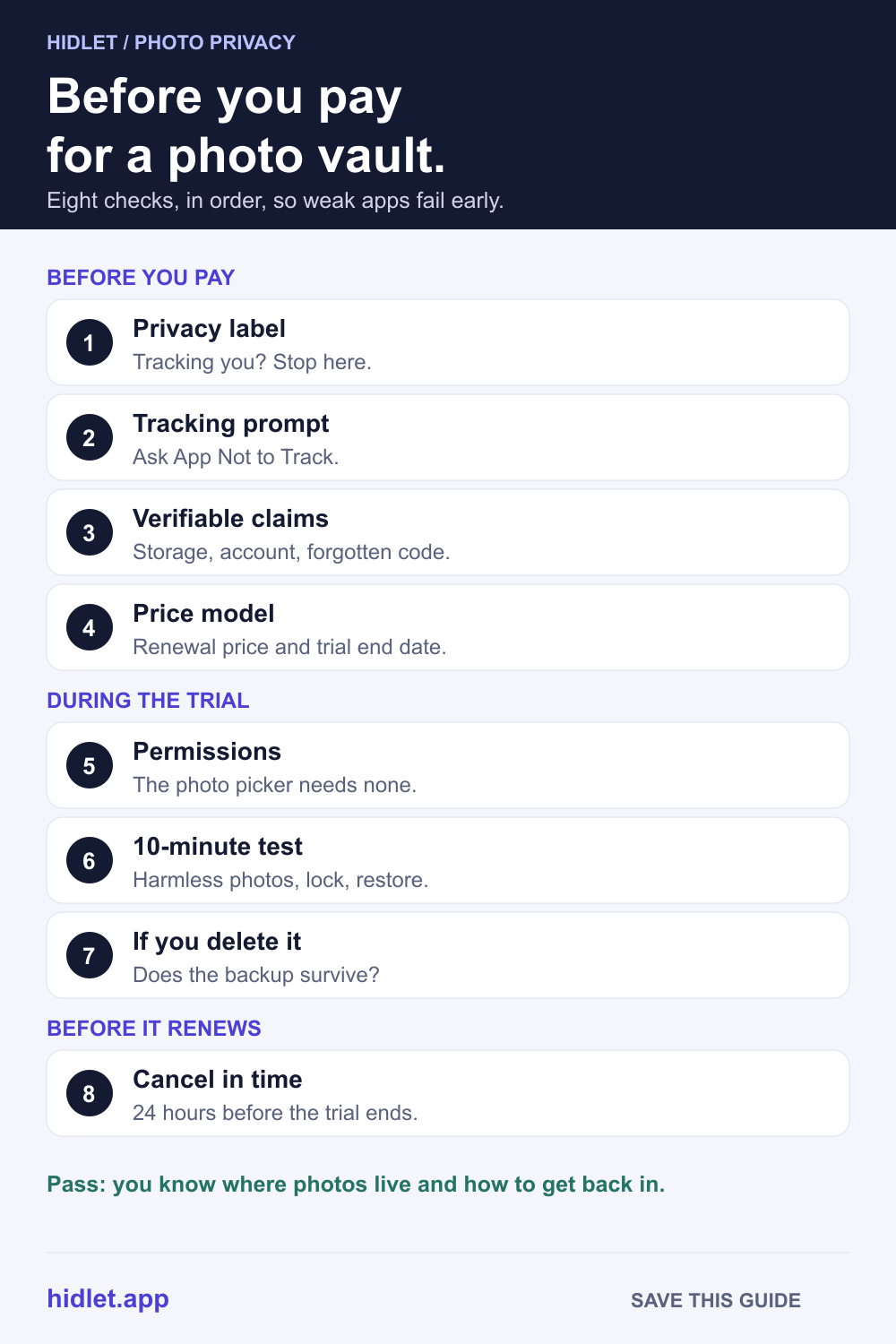
Most vault apps look the same in screenshots. Eight checks, in order, so the weak ones fail before you pay.

Hidlet is an iPhone app
Point your iPhone camera at the code to install. No account needed.
or text me the linkBefore you pay, read the App Privacy section on the App Store listing, then check what the app says about encryption, where your photos are stored and how you get back in if you forget the code. Look at the price model and the trial end date. During the trial, test it with harmless photos, including a restore, before you move anything private.
You’ve narrowed it down to three vault apps. The screenshots look alike, the reviews are mixed, and each one wants a weekly subscription after a three-day trial. Which one actually keeps your photos safe, and which one quietly charges you in a week?
You can find out a lot before you pay, and the trial is long enough to find out the rest. These eight checks run in order, so an app that fails early isn’t worth your time on the later ones. None of them needs any technical knowledge.
Check 1: the App Privacy label
Every App Store listing has an App Privacy section. Scroll down to it before anything else.
- Data Used to Track You. Apple describes this as data from the app linked with data from other companies’ apps, websites or offline properties, and used for ads or shared with a data broker. For a vault, this is a bad sign.
- Data Linked to You. Data collected in a way that’s tied to your identity, such as an email address or an account.
- Data Not Linked to You. Collected, but not tied to your identity.
- Data Not Collected. The developer says it collects nothing.
Two things to know. Apple says the label is self-reported by the developer, so it’s the developer’s statement, not Apple’s test. And Apple’s developer rules let some data go undisclosed, such as optional feedback forms or customer-service requests, if they meet Apple’s conditions. “Data Not Collected” is a good sign, not a guarantee.
If a vault app tracks you for advertising, you can stop here.
Check 2: does it ask to track you?
If an app shows a prompt asking to track your activity across other companies’ apps and websites, tap Ask App Not to Track. Apple says you can still use all of the app either way. You can review every app’s request in Settings → Privacy & Security → Tracking. A vault that needs to track you to work is a vault that shares something.
Check 3: the claims you can actually verify
Look in the listing and the app’s help pages for straight answers to these. Vague answers are an answer too.
| Question | Good sign | Warning sign |
|---|---|---|
| Where are my photos stored? | On the iPhone, and an optional backup you control | “In our cloud”, with no detail |
| Is the backup encrypted before it leaves the phone? | Yes, with a key the company doesn’t hold | Not mentioned |
| Do I need an account? | No, or it’s clear why | An email account is required to start |
| What if I forget the code? | A recovery phrase or key you keep | “Reset by email” only, or nothing |
| What does “AES-256” cover? | Files, names and thumbnails, with the key made from your code | Just the word “encrypted” |
“AES-256” on its own says little: almost every vault uses it, and the cipher is rarely what fails. AES-256 Encryption Explained: What It Means for Photos covers what to ask about it.
Check 4: the price model
Vault apps usually offer a weekly plan, a yearly plan with a free trial, a lifetime purchase, or a mix. Before you tap anything, note three things: the price after the trial, how often it renews, and the date the trial ends.
Apple’s App Review Guidelines say an app should clearly describe what you get for the price before it asks you to subscribe, and that apps that try to trick people into buying a subscription under false pretenses will be removed. If the price on the paywall is hard to find, that’s worth noticing.
Family Sharing. Apple says not every subscription or in-app purchase can be shared, and that developers decide whether their app supports Family Sharing. If that matters, look for Family Sharing under Supports on the listing.
Check 5: what it asks permission for
A vault that imports photos doesn’t need to read your whole library. Apple says that with its system photo picker, you don’t need to give an app permission to choose photos.
If an app asks for full access, think about it. Apple says full access lets an app see your photos and videos, including your hidden photos, even if the Hidden album is locked. Limit Access lets you choose which photos it sees. You can change this any time in Settings → Privacy & Security → Photos. Can Other Apps See Your Hidden Photos on iPhone? explains more.
If the app offers Face ID, that’s fine: Apple says apps only learn whether Face ID succeeded, and never get your face data.
Check 6: a 10-minute test during the trial
Use photos you don’t mind losing. A screenshot of the weather is perfect.
- Import three test photos and a short video. Check they open full-size and play.
- Leave the app and come back. It should ask for the code again.
- Check the app switcher. Swipe up from the bottom of the screen and pause to see open apps; the vault shouldn’t show your photos there.
- Enter a wrong code a few times. A good vault slows down guessing.
- Try the recovery route. Use “forgot code” with the test vault, so you know it works before you need it.
- Try the backup. Turn it on, then check what you’d need on a new phone.
Check 7: what happens if you delete it
Apple says deleting an app removes it and its data from your iPhone. For a vault, that can mean the only copy of your photos. Before you trust one, find out whether its backup survives the app being deleted, and how you’d get the photos back. Does Deleting a Photo Vault App Delete Your Photos? has the checks.
Check 8: how to cancel and get a refund
To cancel, go to Settings → your name → Subscriptions, tap the subscription and tap Cancel Subscription. Apple says that for a free trial you don’t want to keep, cancel at least 24 hours before it ends. If there’s no Cancel button, or you see an expiry date in red, it’s already cancelled. The FTC’s advice for any trial is blunt: if you don’t cancel on time, you’ll probably be charged. Put the date in your calendar.
If you were charged by mistake, you can request a refund at reportaproblem.apple.com.
How Hidlet does on the same checks
We’d rather you run the checks than take our word for it, but here are Hidlet’s answers. Hidlet’s privacy label is designed to be “Data Not Collected”: it has no analytics, ads or tracking tools, and no accounts. Photos are encrypted with AES-256-GCM on your iPhone, in vaults that open with a pattern you draw. The encrypted backup is optional and goes to your own iCloud, encrypted on the phone first. If you forget a pattern, the vault’s 9-word recovery phrase opens it; there is no reset by email, because we never hold your keys. There’s a free plan with up to 3 vaults, and an optional Pro upgrade. Hidlet is available on the App Store.
Frequently asked questions
Is the App Store privacy label checked by Apple?
Apple says the information on the label is self-reported by the developer, and its developer page says developers are responsible for keeping their answers accurate. Read it as the developer's own statement.
When does a free trial start charging?
Unless you cancel, the trial turns into a paid subscription. Apple says that if you don't want a trial subscription to renew, cancel it at least 24 hours before the trial ends.
Can I get a refund on an App Store subscription?
You can ask. Sign in at reportaproblem.apple.com, tap I'd like to, choose Request a refund, pick a reason, tap Next, choose the item and tap Submit. Apple says to expect an update in 24 to 48 hours.
Can I share a vault app's lifetime purchase with my family?
Only if the developer allows it. Apple says not every subscription or in-app purchase can be shared, and that developers decide whether their app supports Family Sharing. Look for Family Sharing under Supports on the listing.
Sources
- Apple Support — App privacy details on the App Store
- Apple Developer — App privacy details
- Apple Support — If an app asks to track your activity
- Apple Legal — Photos & Privacy
- Apple Developer — Delivering an enhanced privacy experience in your photos app
- Apple Support — About Face ID advanced technology
- Apple iPhone User Guide — Remove or delete apps on iPhone
- Apple Support — How to cancel a subscription from Apple
- Apple Support — Request a refund for apps or content that you bought from Apple
- Apple Support — Share subscriptions and purchases with Family Sharing
- Apple Developer — App Review Guidelines
- FTC — Getting In and Out of Free Trials, Auto-Renewals, and Negative Option Subscriptions
Save this guide