AES-256 Encryption Explained: What It Means for Photos
Every vault app says AES-256, and that part is almost never what fails. Here is what to ask instead.

Hidlet is an iPhone app
Point your iPhone camera at the code to install. No account needed.
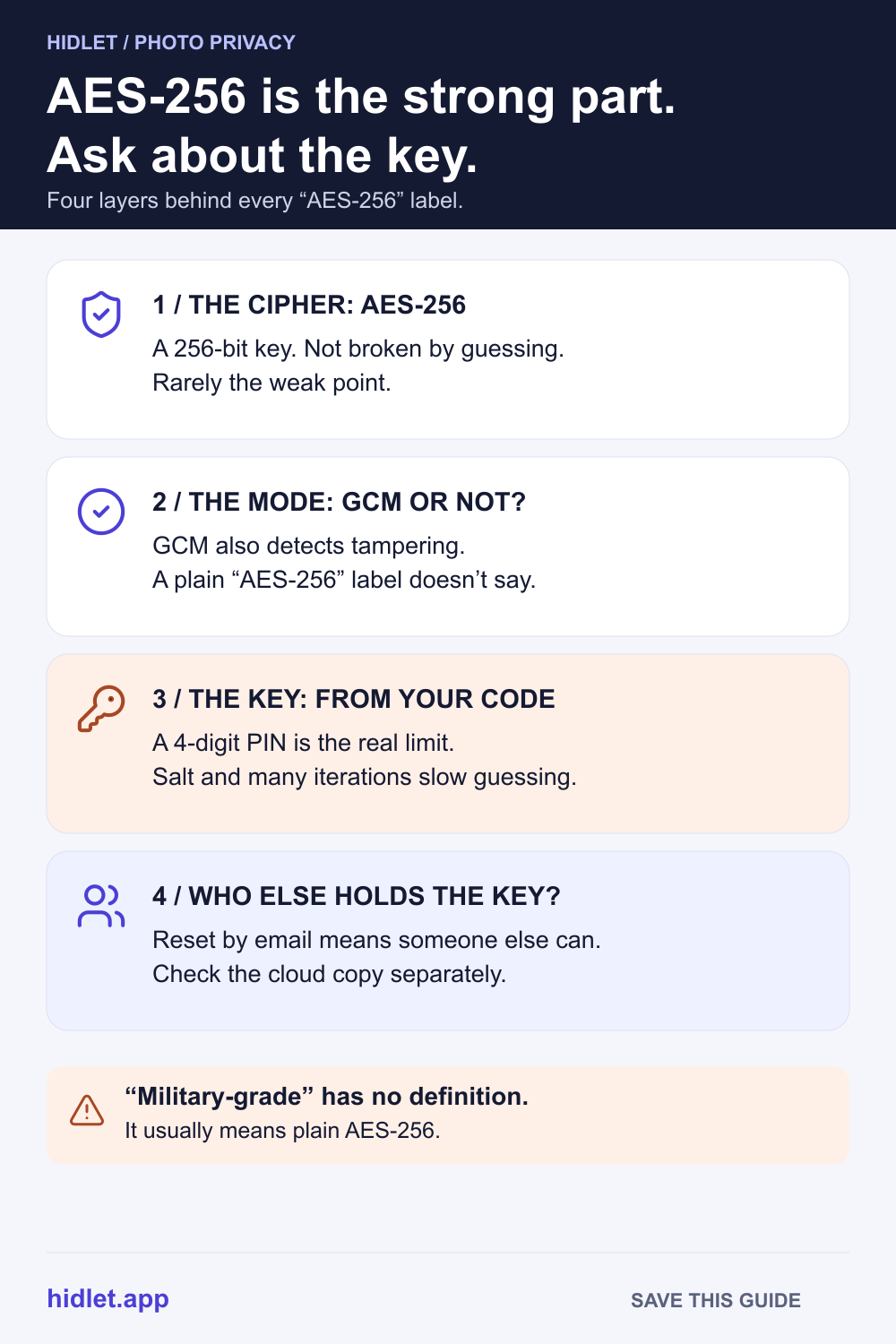
or text me the linkAES-256 is the US government standard cipher with a 256-bit key, and nobody can break it by guessing the key. So when a photo vault says "AES-256", the real questions are elsewhere. Where does the key come from? How strong is the password or pattern behind it? Who else holds a copy? And is there a cloud copy encrypted some other way?
You’re comparing photo vault apps, and every listing says the same thing: AES-256, bank-level, military-grade. If they all use the same encryption, they should all be equally safe. They aren’t, and the reason is that “AES-256” names the one part of the system that almost never fails.
This guide explains what AES-256 is in plain words, how a vault turns your password into a key, why that step matters more than the cipher, and five questions that tell you more than the label does.
What AES-256 is
AES, the Advanced Encryption Standard, is a cipher published by NIST, the US standards body, as FIPS 197. It takes your data in blocks of 128 bits and scrambles each one with a secret key, so that only someone with the same key can unscramble it.
The number is the key size. AES comes in three:
| Version | Key size | Rounds of scrambling | NIST security strength |
|---|---|---|---|
| AES-128 | 128 bits | 10 | 128 bits |
| AES-192 | 192 bits | 12 | 192 bits |
| AES-256 | 256 bits | 14 | 256 bits |
A 256-bit key has 2²⁵⁶ possible values, a number with 78 digits. Trying them all isn’t a matter of a faster computer; it’s not a realistic attack at all. NIST’s key-management guide gives AES-256 a security strength of 256 bits, and its 2026 post-quantum report puts AES-256 in the highest quantum security category, saying it doesn’t expect to need to move away from symmetric standards like AES.
So the cipher is safe. Everything interesting happens around it.
The mode: does it notice tampering?
AES on its own scrambles one block. To encrypt a whole photo, an app runs it in a mode, and the mode decides what else you get.
GCM (Galois/Counter Mode) is the common choice for files. NIST describes it as authenticated encryption: besides keeping the data secret, it can detect both accidental and deliberate changes to it. If someone alters an encrypted photo, the app finds out instead of showing a corrupted file.
GCM has one hard rule. Each encryption needs a fresh value called a nonce (NIST calls it the IV), and NIST warns that if one is ever repeated with the same key, the protection can fail almost entirely. NIST calls this rule almost as important as keeping the key secret. A vault that says “AES-256-GCM” is telling you something useful; one that just says “AES-256” isn’t saying which mode it uses.
The key: where does it come from?
This is the question that decides how safe a vault really is.
Nobody types a 256-bit key. You type a PIN, a password or a pattern, and the app turns it into a key. NIST’s guidance on password-based keys explains the problem plainly: passwords have low entropy, so they aren’t suitable to be used directly as keys. And if someone copies the encrypted files, they can guess offline, on hardware of their own choosing, so the strength of the password is critical.
Two tools make guessing harder:
- A salt. A random value mixed in, so every vault has to be attacked separately. NIST says it should be at least 128 bits.
- Many iterations. The password is run through a function like PBKDF2 (defined in RFC 8018) thousands or millions of times, so every guess costs the attacker that much work. NIST’s 2010 guidance says the iteration count should be as large as is practical, recommends at least 1,000, and says 10,000,000 may suit especially critical keys.
But no number of rounds rescues a short code. A 4-digit PIN has 10,000 possibilities. Even if each guess is slow, that’s a small list. NIST’s key-management guide makes the general point: a key’s strength drops to the strength of the weakest process that protects it. A 256-bit key made from a 4-digit PIN is, in practice, a 4-digit PIN.
Your iPhone handles this better than any app can on its own. Apple says the passcode is tied to a hardware key inside the device, so guesses have to be made on that iPhone, about 80 milliseconds each, with delays enforced by the Secure Enclave. The phone also encrypts the files you store: Apple says every file gets its own new 256-bit key, and on A14 through A18 and M1 or later devices the encryption is AES-256 in XTS mode (A9–A13 models use AES-128). Is the iPhone Hidden Album Encrypted? explains what that covers.
Common misconceptions
“Military-grade” means something extra. We found no standards body that defines it. It’s a marketing phrase, usually for plain AES-256. RFC 9151, an NSA-written profile of its CNSA suite for national security systems, lists AES with 256-bit keys in GCM mode, which is what many ordinary apps use.
“AES-256” means the company can’t see my photos. Not on its own. Encryption only keeps out people who don’t have the key. If the company holds the key, it can decrypt. Apple is open about this for iCloud: with standard protection, Apple holds the keys for most data, including Photos, and can decrypt it on your behalf; with Advanced Data Protection, only your trusted devices hold the keys for most of your iCloud data. Can Apple See Your Hidden Photos? has the details.
“Encrypted on the phone” means encrypted in the cloud. Check the backup separately. A vault can encrypt files carefully on the iPhone and then back them up somewhere they’re encrypted with a key the company keeps.
Bigger is always better. AES-128 is also far beyond guessing. The difference between 128 and 256 bits matters much less than the difference between a 4-digit PIN and a long passphrase.
Five questions to ask instead
- Which mode? AES-256-GCM, or another authenticated mode, tells you files can’t be altered without the app noticing.
- What makes the key? A password, a PIN, a pattern? How long can it be, and does the app slow guessing down?
- Who else holds the key? If there’s a password reset by email, someone other than you can get in.
- What happens to the cloud copy? Is it encrypted on the phone first, with a key the company never sees?
- What does it protect against? A stranger who copies files, someone who borrows your unlocked phone, or someone who knows your passcode are three different problems.
For more on the last one, see Pattern Lock vs PIN vs Face ID: Which Protects Photos.
How Hidlet answers them
Hidlet encrypts every photo, video, file name and thumbnail with AES-256-GCM on your iPhone before it’s saved. Each vault has its own random key, and the pattern you draw on a 5×5 grid is what unlocks it. That pattern is never saved: Hidlet runs it through PBKDF2-HMAC-SHA512 600,000 times, mixed with a random secret kept in your Keychain, separate from the backup. Someone who only has a copy of your backup can’t start guessing without that secret. Wrong patterns add a growing wait, up to 15 minutes each.
Nobody else holds a copy of those keys, including us. The optional encrypted backup goes to your own iCloud, encrypted on the phone first.
What it can’t do: a short, simple pattern is easier to guess than a long one, and if someone forces you to open a vault, encryption doesn’t help. That’s what the Pro duress vault is for. Hidlet is available on the App Store.
Frequently asked questions
Can AES-256 be cracked?
Not by guessing the key. NIST gives AES-256 a security strength of 256 bits, and its post-quantum report puts it in the highest of five security categories, with no expected need to move away from it. Attacks go after the password, the device or the way the key is handled instead.
Is AES-256 safe against quantum computers?
NIST says symmetric standards like AES are less vulnerable to quantum computers and that it doesn't expect to need to move away from them. Its 2026 report puts AES-256 in the highest quantum security category.
What does "military-grade encryption" mean?
Nothing official. We found no standards body that defines it. It usually just means AES-256. The NSA's own suite for national security systems lists AES with 256-bit keys in GCM mode.
Does my iPhone already use AES-256?
Apple says every file you store gets its own new 256-bit key, and that on A14 through A18 and M1 or later devices the encryption is AES-256 in XTS mode (older A9–A13 models use AES-128 in XTS mode). That covers your whole photo library, not just one album.
Sources
- NIST FIPS 197 — Advanced Encryption Standard (AES)
- NIST SP 800-38D — Galois/Counter Mode (GCM)
- NIST SP 800-132 — Recommendation for Password-Based Key Derivation
- NIST SP 800-57 Part 1 Rev. 5 — Recommendation for Key Management
- NIST IR 8547 — Transition to Post-Quantum Cryptography Standards
- RFC 8018 — PKCS
- RFC 9151 — Commercial National Security Algorithm (CNSA) Suite Profile for TLS and DTLS
- Apple Platform Security — Data Protection overview
- Apple Platform Security — Passcodes and passwords
- Apple Support — iCloud data security overview
Save this guide