Pattern Lock vs PIN vs Face ID: Which Protects Photos
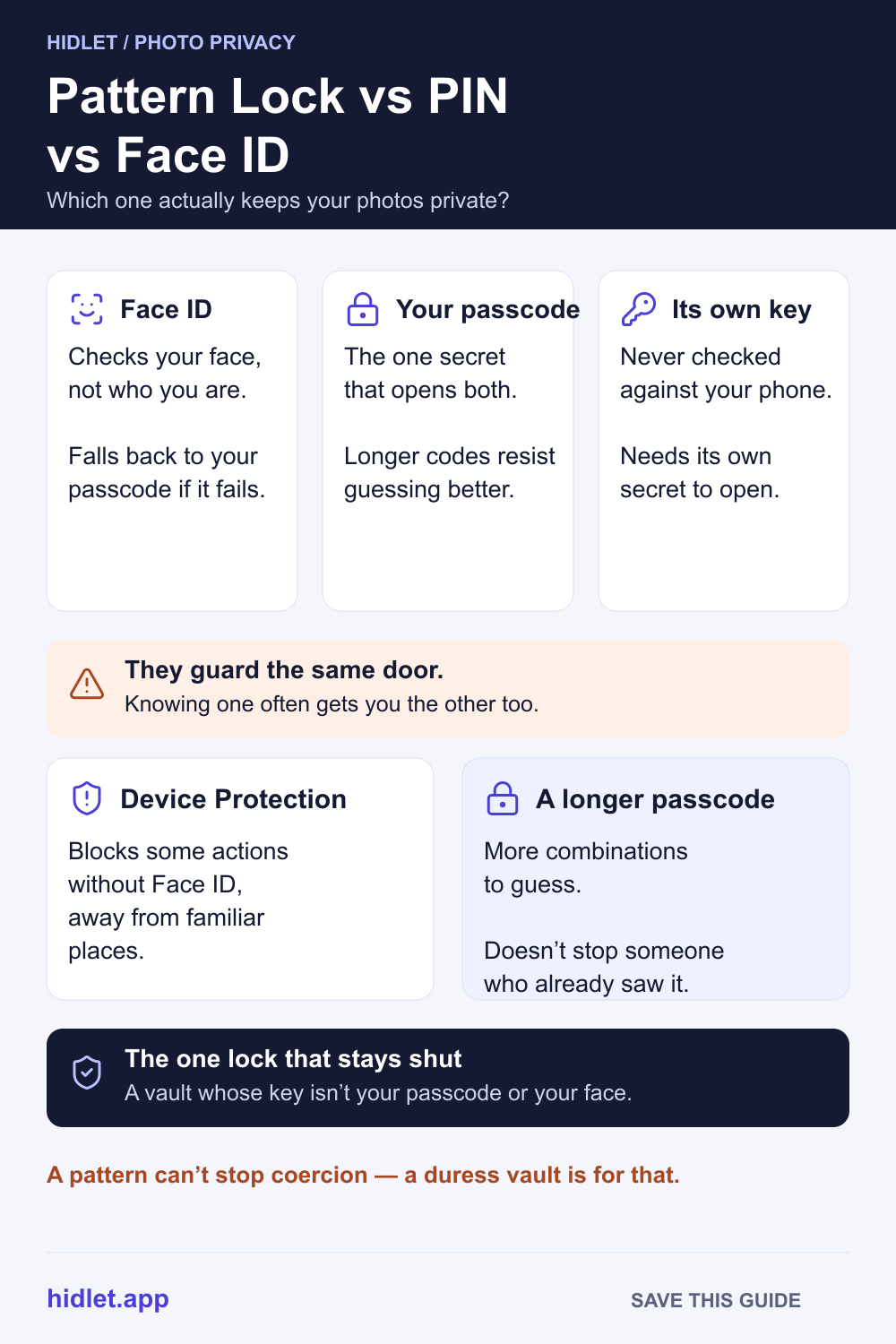
Face ID and your passcode guard the same door. A pattern that isn't either guards just your photos.

Hidlet is an iPhone app
Point your iPhone camera at the code to install. No account needed.
or text me the linkFace ID and your iPhone passcode protect the same thing — the whole phone — so someone who has either one can usually get into anything behind it, including a Face ID-locked album. The only lock that stays shut is one with a key of its own, separate from your passcode and your face.
You lock your private photos behind Face ID, or maybe just your passcode, and it feels like enough — until you think about exactly who you’re keeping out. A stranger who picks up your phone off a table is one problem. A partner who’s watched you type your passcode a hundred times, or whose face could pass a glance at the camera, is a different one entirely. This guide covers how Face ID, a passcode or PIN, and a lock with its own separate key each actually hold up, and which one to reach for depending on who you’re protecting against.
How each one actually works
Face ID. Apple says a random stranger has less than a 1 in 1,000,000 chance of unlocking your iPhone with Face ID, using depth data and anti-spoofing checks that a photo or mask can’t fool. It’s also “attention aware”: Apple says it confirms your eyes are open before unlocking, even if you’re wearing a mask, which is meant to make it harder to unlock by holding the phone up to someone who isn’t paying attention on purpose.
A passcode or PIN. Your iPhone passcode is a six-digit code by default, though Settings lets you switch to a shorter numeric code or a longer custom one, including letters. Unlike Face ID, nothing about a passcode checks who’s entering it — it works the same whether you type it or someone else does, which is exactly what makes it both simple and a little fragile.
A pattern that isn’t your passcode. The third option doesn’t check your face or your phone’s unlock code at all. A vault that uses its own separate pattern, PIN or password — one the phone never compares against your actual lock screen — stays closed to anyone who only has what unlocks your iPhone.
Where Face ID and your passcode actually agree
Here’s the part that catches people out: Face ID and Touch ID don’t replace your passcode — Apple’s own Platform Security guide is explicit that they work “within thoughtful boundaries and time constraints,” and a short list of sensitive actions (installing updates, erasing the device, changing passcode settings, and more) always falls back to the passcode regardless of Face ID. Practically, that means your passcode is the one secret that can always stand in for Face ID. Five failed Face ID attempts, a restart, or just over 48 hours since the last unlock, and the phone asks for the passcode instead.
Apple’s own Hidden album runs on exactly this: since iOS 16, opening it asks for Face ID or Touch ID, not a password of its own. Apple’s support page doesn’t say that specific prompt falls back to your typed passcode — but it doesn’t need to. Someone who already has your passcode can unlock the whole phone, then go to Settings → Face ID & Passcode and enroll their own face, which passes that same Face ID check from then on. Either way, knowing your passcode gets them to the same place, so Face ID on that album isn’t really a second lock against that person; it’s the same lock with a different-looking door.
Twins, close siblings, and children under 13 also get a specific callout from Apple: their odds of passing as you to Face ID are higher, and Apple recommends a passcode instead if that’s a real concern in your house.
The safe way: close the fallback, don’t just add a face
Two built-in settings narrow the gap, without fully closing it.
- Turn on Stolen Device Protection (Settings → Face ID & Passcode → Stolen Device Protection). Away from places your iPhone calls “familiar” — home, work, anywhere you regularly use it — it requires Face ID or Touch ID with no passcode fallback at all for a short list of sensitive actions, and adds a roughly one-hour delay before others, like changing your Apple Account password. Set “Require Security Delay” to Always if you want that protection at home too, not just on the move.
- Switch to a longer passcode (Settings → Face ID & Passcode → Change Passcode → Passcode Options). A custom numeric or alphanumeric code has far more possible combinations than the default six digits, which makes it harder to guess outright — though neither Apple’s page nor this guide can tell you that a longer code stops someone who’s simply seen you type it.
Neither setting changes the basic shape of the problem: Face ID and your passcode are still two doors into the same room. Someone who has one can, in most cases, get through the other.
What to do next
If the person you’re worried about is a stranger who might grab your phone off a bar table, Face ID plus an ordinary passcode is genuinely a strong, Apple-tested pair, and Stolen Device Protection raises the bar further. If it’s someone who already knows your passcode, has seen your face pass a Face ID check, or could simply ask you to unlock it, neither one is a real second lock — you need something that doesn’t answer to either.
That’s the one job a vault with its own separate key does. Hidlet works this way: you draw a pattern on a 5×5 grid, and that pattern — not your iPhone passcode, not your face — becomes the key that unlocks one vault. Your phone’s passcode can’t open it, because the phone was never taught to check it against that pattern. Different patterns open different vaults, and the app never lists how many exist.
What Hidlet can and can’t protect
Being honest about the edges: a separate pattern stops someone who merely knows your phone’s passcode or could pass a Face ID check. It doesn’t stop someone who can force you to draw the real pattern yourself. That’s what a duress pattern is for — it opens a harmless vault and, in the background, removes the others from this phone, while your iCloud backup keeps them safe to restore later. Hidlet is available on the App Store.
At a glance
| Lock | Stops a stranger who grabs your phone? | Stops someone who knows your passcode? | Stops someone who could pass a Face ID check? |
|---|---|---|---|
| Face ID alone | Yes | No (passcode fallback) | No |
| Passcode / PIN alone | Mostly | No | Not applicable |
| Face ID + Stolen Device Protection | Yes | Partly, away from familiar places | No |
| Vault with its own separate key | Yes | Yes | Yes |
If you’re worried about someone specific
If the reason you’re asking is that someone checks, controls or has threatened you over your phone, that’s a safety question first and a settings question second. Apple’s Personal Safety guide covers checking who has access to your devices and accounts, and local support lines can help if you’re in danger.
Frequently asked questions
Does Face ID stop someone who knows my passcode from opening my Hidden album?
No. Apple's Hidden album prompt itself only asks for Face ID or Touch ID, not a passcode directly — but anyone who has your passcode can unlock your whole phone, then add their own face in Settings → Face ID & Passcode, which passes that same prompt from then on. Biometrics never replace your passcode either way, so the passcode is still the one secret worth protecting most.
Is a longer, custom passcode actually safer than the default six digits?
A longer or alphanumeric passcode has far more possible combinations, so it resists guessing better. Apple's own passcode page offers the option (Passcode Options) but doesn't rate one as safer than another — that part is ordinary security reasoning, not an Apple claim.
Does Stolen Device Protection stop someone who already knows my passcode?
Partly. Away from your familiar locations, it blocks a short list of sensitive actions without Face ID or Touch ID at all, and adds a roughly one-hour delay before others. At home, unless you set the delay to Always, your passcode still works as usual.
Can a pattern used only inside one app really be safer than Face ID or a passcode?
For this specific problem, yes. It isn't checked against your phone's own unlock records, so knowing your passcode or sharing your face doesn't open it — someone would have to separately learn that pattern.
Sources
- Apple Support — About Face ID advanced technology
- Apple Support — Use a passcode with your iPhone, iPad, or iPod touch
- Apple Support — About Stolen Device Protection for iPhone
- Apple Platform Security — When a device passcode or password is required
- Apple Support — Hide photos on your iPhone, iPad, Mac or Apple Vision Pro with the Hidden album
Save this guide